

Documentation Index
Fetch the complete documentation index at: https://guide.promethex.market/llms.txt
Use this file to discover all available pages before exploring further.
Let’s Make a Trade
You’ve signed in and you have some USDC. Now let’s walk through placing your very first trade on PrometheX, from browsing markets to tracking your position.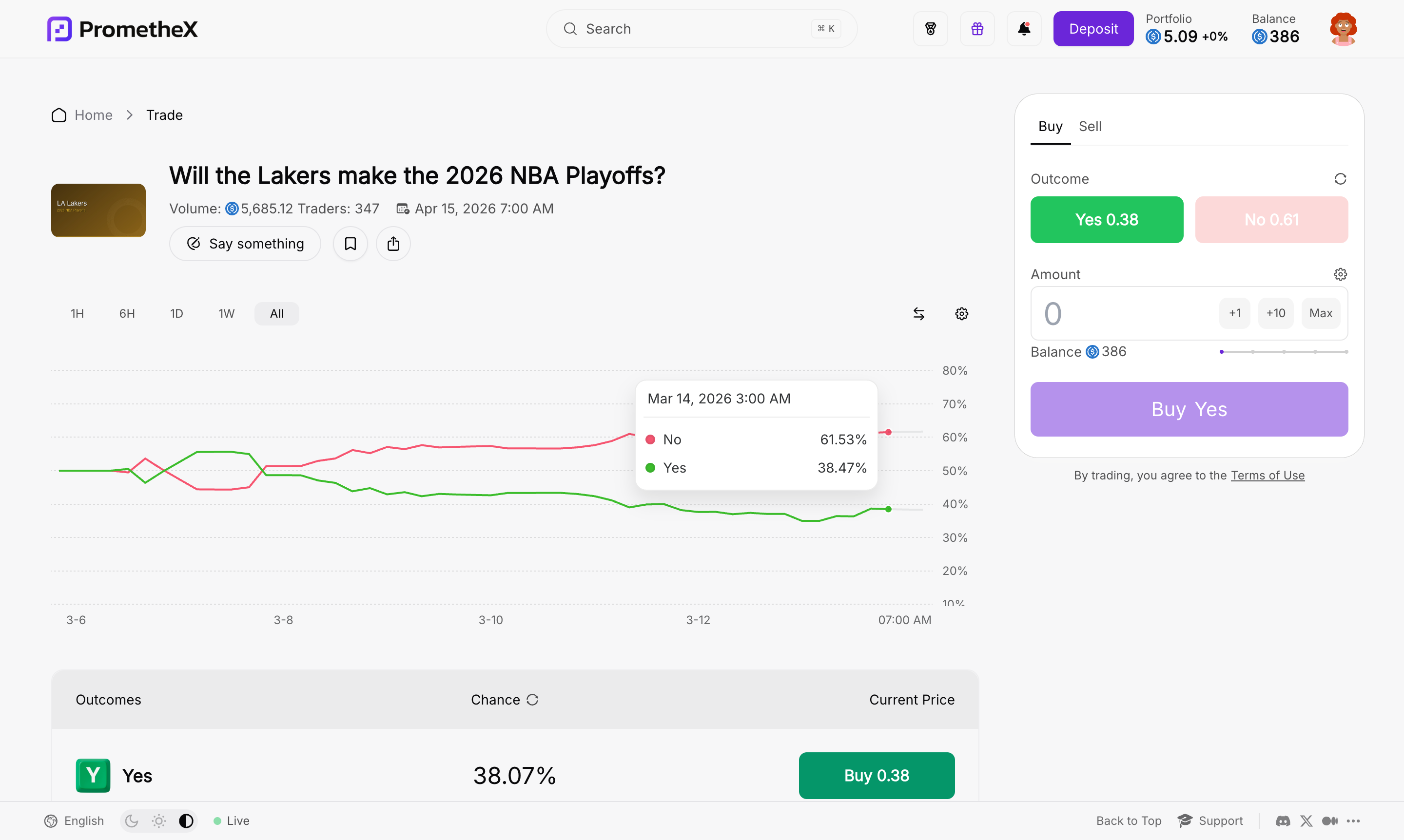
Browse markets
From the home page, you’ll see a list of markets — questions about real-world events. Each market card shows:
- The question (e.g., “Will ETH reach $5,000 by July 2026?”)
- The current prices of Yes and No shares
- The trading volume (how much has been traded)
- The end date (when the market closes)
Open a market
Tap on a market to see its detail page. Here you’ll find:
- A price chart showing how prices have moved over time
- The current prices of all outcomes
- The market description explaining exactly what needs to happen for each outcome to win
- Community discussion — what other traders are saying
Choose your side
Decide which outcome you want to trade on. For a binary market, you’ll see two buttons:
- Yes — You think the event will happen
- No — You think it won’t
Enter your amount
Type in how much USDC you want to spend. The trade panel will show you:
- Shares you’ll receive — How many outcome shares you’re buying
- Average price — The average price per share for your order
- Potential payout — How much you’ll receive if you win ($1.00 per share)
- Potential profit — Your payout minus your cost
Review and confirm
Double-check the details on the confirmation screen:
- Which outcome you’re buying
- How much you’re spending
- How many shares you’ll get
- Your potential payout
There are no gas fees. PrometheX covers the blockchain transaction costs for you, so the only cost is the USDC you’re spending on shares.
Track Your Position
After your trade, you can monitor it anytime:- Market page — See your position size and current value right on the market you traded
- Portfolio — View all your active positions across every market in one place
- Price updates — Watch prices move in real time as other traders buy and sell
What Happens Next?
Your shares will be worth money when the market resolves. Here are the possible outcomes:| Scenario | What happens | Your payout |
|---|---|---|
| You’re right | The outcome you picked wins | $1.00 per share — tap “Claim” to collect |
| You’re wrong | The other outcome wins | $0.00 — your shares expire worthless |
| You sell early | You sell before the market resolves | Whatever the current market price is |
Common Questions
How much can I lose?
How much can I lose?
The most you can lose is the USDC you spent on shares. Your downside is always limited to your initial trade amount — you can never owe more than what you put in.
Can I buy both Yes and No?
Can I buy both Yes and No?
Technically yes, but it doesn’t make sense — buying both sides guarantees a small loss because of the trading fee. Choose the side you believe in.
What if I change my mind?
What if I change my mind?
You can sell your shares at any time before the market resolves. Just go to the market page, select “Sell,” and confirm.
How long does a trade take?
How long does a trade take?
Most trades confirm within a few seconds. PrometheX runs on Arbitrum, which processes transactions very quickly.
Next Steps
How Trading Works
Understand share pricing, the market maker, and how payouts work.
How Markets Work
Learn about the lifecycle of a market from creation to payout.